
Sahara/How To Release
< Sahara
发布代码/压缩包/pypi
1. 添加发布标签,例如“0.7.0”,并附带描述:“Sahara 客户端版本 0.7.0”;该标签应使用您的个人 gpg 密钥签名
git tag -s 0.7.0
2. 然后检查标签是否在仓库中:“git tag -v 0.7.0”,您应该看到类似如下内容:
object bb4086b3af0fa4ab5fc8067b539a9134894429f6
type commit
tag 0.1.1
tagger Sergey Lukjanov <slukjanov@mirantis.com> 1368016327 +0400
3. 将标签推送到 gerrit,您需要是核心团队成员才能执行此操作,命令如下:
git push gerrit 0.7.0
4. 现在前往 http://status.openstack.org/zuul/,您应该看到类似如下内容:
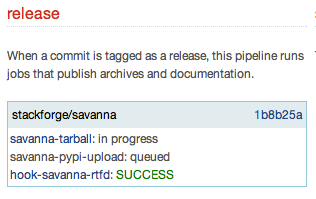
5. 当 stackforge/sahara 消失时,发布就可用了,请检查以下链接以获取正确的版本:
https://pypi.python.org/pypi/python-saharaclient/
http://tarballs.openstack.org/python-saharaclient/
6. 前往 launchpad 对应的系列 - https://launchpad.net/python-saharaclient/0.7.0 并使用“Release now”(立即发布)按钮发布版本;在这里,您应该以 yyyy-mm-dd 格式指定发布日期和一些说明,例如:
# It's available in pypi, just execute pip install sahara to install.
# tarball: http://tarballs.openstack.org/python-saharaclient/python-saharaclient-0.7.0.tar.gz
7. 现在您应该将所有与此版本相关的 bug 的状态从 Fix Commited(已修复提交)更改为 Fix Released(已修复发布)
8. 上传压缩包到已发布 launchpad 里程碑 - https://launchpad.net/python-saharaclient/0.7.x/0.7.0,使用“Add download file”(添加下载文件)按钮
9. 检查 pypi 发布 (pip install python-saharaclient) :)
10. 向社区发送邮件 :)
OpenStack 发布流程
https://wiki.openstack.org/wiki/ReleaseTeam/How_To_Release

