
Neutron/ML2/MechCiscoNexus
目录
适用于 Cisco Nexus 设备的 Neutron ML2 驱动程序
概述
Cisco Nexus ML2 机制驱动程序实现了 ML2 插件机制驱动程序 API。Cisco Nexus ML2 机制驱动程序管理多种类型的 Cisco Nexus 交换机。
注意:此驱动程序支持 Cisco Nexus 3000 – 9000 型号的 VLAN 网络类型,仅支持 Cisco Nexus 3100 和 9000 交换机的 VXLAN 覆盖网络类型。有关 VxLAN 覆盖配置详细信息,请参阅 http://docwiki.cisco.com/wiki/OpenStack/ML2NexusMechanismDriver。
先决条件
Nexus 交换机支持需要以下 OS 版本和软件包
- Cisco NX-OS 5.2.1 (Delhi) Build 69 或更高版本。
- paramiko 库,用于 python 的 SSHv2 协议库
- 以下两种受支持的操作系统之一
- RHEL 6.1 或更高版本
- Ubuntu 11.10 或更高版本
- 软件包:python-configobj-4.6.0-3.el6.noarch (或更高版本)
- 软件包:python-routes-1.12.3-2.el6.noarch (或更高版本)
- 软件包:pip install mysql-python
- 用于 NETCONF 客户端的 ncclient v0.4.2 Python 库。有关如何下载修改后的库的说明,请参见以下内容。有关 ncclient 的更多信息,请参阅 http://ncclient.grnet.gr/。
使用 shell 提示符中的 pip 包管理器获取 ncclient 库
pip install ncclient == 0.4.2
您的 Nexus 交换机必须按照下一节 Nexus 交换机设置 中所述进行配置。
Nexus 交换机设置
- 您的 Nexus 交换机必须连接到与 OpenStack 数据网络分开的管理网络。插件通过此网络与交换机通信以设置您的数据流。
- 交换机必须启用
ssh登录。 - 云中的每个计算主机必须使用专门用于 OpenStack 数据流量的接口连接到交换机。
- 在 ML2 Nexus 机制驱动程序尝试配置交换机之前,交换机必须是控制器节点上的已知主机。为了确保交换机是已知主机,请在使用
ssh之前从控制器节点手动登录到交换机,然后再创建实例。 - 本节中未列出的所有其他交换机配置,例如使用
no shutdown和switchport mode trunk配置接口,必须由交换机管理员执行。
目录结构
Cisco Nexus 机制驱动程序代码位于以下目录中
<neutron_install_dir>/neutron/neutron/plugins/ml2/drivers/cisco/nexus
Cisco Nexus 机制配置模板位于
<neutron_install_dir>/neutron/etc/neutron/plugins/ml2/ml2_conf_cisco.ini
在两种情况下,<neutron_install_dir> 都是安装 Neutron 项目的目录。这通常是分配给 Neutron 的用户的家目录。
配置
VLAN 配置
要配置 Cisco Nexus ML2 机制驱动程序,请执行以下操作
使用语法模板 neutron/etc/neutron/plugins/ml2/ml2_conf_cisco.ini 创建配置文件。
将 Nexus 交换机信息添加到配置文件。包括以下信息(请参见下面的示例)
- 交换机的 IP 地址
- 连接到交换机的节点的宿主机名和端口
- 宿主机连接到的交换机端口
- Nexus 交换机凭据用户名和密码
在启动 neutron-server 时,在命令行中包含配置文件。您可以配置多个交换机以及每个交换机上的多个宿主机。
# Use section header 'ml2_mech_cisco_nexus:' followed by the IP address of the Nexus switch.
[ml2_mech_cisco_nexus:1.1.1.1]
# Hostname and port used on the switch for this compute host.
# Where 1/2 indicates the "interface ethernet 1/2" port on the switch.
compute-1=1/2
# Port number where the SSH will be running at the Nexus Switch. Default is 22 so this variable
# only needs to be configured if different.
# ssh_port=22
# Provide the Nexus log in information
username=admin
password=mySecretPasswordForNexus
虚拟端口通道 (vPC) 配置
Cisco 机制插件支持 vPC 设置中的多归宿主机。典型的 vPC 设置如图所示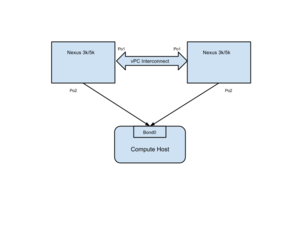
先决条件
- vPC 互连必须按照本文档所述进行设置:NXOS vPC 配置。Cisco 插件不会设置交换机之间的 vPC 互连通道。
- 宿主机上的数据接口必须绑定。此绑定接口必须连接到外部网桥。
插件配置
使用每个宿主机的多个连接在插件中配置 vPC。例如,如果宿主机 1 通过端口通道 2 连接到两个 nexus 交换机 1.1.1.1 和 2.2.2.2
[ml2_mech_cisco_nexus:1.1.1.1]
# Hostname and port used of the node
host1=port-channel:2
# Port number where the SSH will be running at the Nexus Switch, e.g.: 22 (Default)
ssh_port=22
# Provide the Nexus credentials, if you are using Nexus switches. If not this will be ignored.
username=admin
password=mySecretPasswordForNexus

[ml2_mech_cisco_nexus:2.2.2.2]
# Hostname and port used of the node
host1=port-channel:2
# Port number where the SSH will be running at the Nexus Switch, e.g.: 22 (Default)
ssh_port=22
# Provide the Nexus credentials, if you are using Nexus switches. If not this will be ignored.
username=admin
password=mySecretPasswordForNexus
指定 vPC 设置的以太类型(端口通道、以太通道等)。
注意:如果您未指定以太类型,则插件假定以太类型为以太网。
非 vPC 配置不需要更改配置。非 vpc 设置不受此功能的影响。
为 Cisco Nexus 机制驱动程序配置 Devstack
VLAN 配置
有关常规 Devstack 配置,请参阅 ML2 主页 https://wiki.openstack.org/wiki/Neutron/ML2#ML2_Configuration。
如 ML2 主页所述,将 devstack localrc 变量 Q_ML2_PLUGIN_MECHANISM_DRIVERS 设置为所需的机制驱动程序。对于 Cisco Nexus MD,所需的驱动程序是
Q_ML2_PLUGIN_MECHANISM_DRIVERS=openvswitch,cisco_nexus
通过将以下内容添加到 devstack localrc 文件来使 nexus 交换机配置可访问
# CONF_PATH can be any valid directory path on the devstack system.
Q_PLUGIN_EXTRA_CONF_PATH=(/home/openstack)
Q_PLUGIN_EXTRA_CONF_FILES=(ml2_conf_cisco.ini)
创建文件 /home/openstack/ml2_conf_cisco.ini 并添加 nexus 交换机信息。配置文件语法在上面的 #Configuration 部分中描述。

