
Manila/design/manila-mitaka-data-replication
Manila 灾难恢复 / 数据复制设计
简介
复制的共享将在 Manila 中实现,无需添加任何新服务或新驱动程序。创建复制共享以及添加/删除副本和其他与复制相关的操作的代码都将进入现有的共享驱动程序。允许此操作的最重要更改是共享驱动程序将负责与实现任何复制任务所需的所有存储控制器通信,即使这意味着向其他可用性区域(或 AZ)中的其他存储控制器发送命令。
虽然我们无法知道每个存储控制器的工作方式以及每个供应商将如何实现复制,但这种方法应该为驱动程序编写者提供所需的所有灵活性,以便以最少的 Manila 核心复杂性来实现他们需要的内容。已经有驱动程序读取其他驱动程序的配置节的示例,当操作需要与 2 个后端通信时。Manila 共享管理器预计将向其请求操作的后端通信所有必要的后端详细信息,这些后端存在于 AZ 之间的共享副本中。
支持 AZ 内的复制,但理想的解决方案应将 AZ 视为故障域。因此,此功能在 AZ 之间的复制用例中表现出色。
支持的复制类型
我们希望长期支持 3 种数据复制风格
- 可写 - 类似于 Amazon EFS 的同步复制共享,所有副本均可写。不支持晋升,也不需要。
- 可读 - 镜像式复制,具有一个主(可写)副本和一个或多个辅助(只读)副本,这些副本可以在晋升辅助副本后变为可写。
- dr(用于灾难恢复)- 通用复制,辅助副本在晋升其中一个辅助副本之前无法访问。
副本状态
每个副本都有一个 replica_state,它有 4 个可能的值
- active - 所有可写副本都是活动的。
- in_sync - 被动副本与活动副本同步,可以晋升为活动副本。
- out_of_sync - 被动副本已过时,或尚未同步的新副本。
- error - 调度器未能调度此副本,或者在晋升非活动副本期间发生了一些不可恢复的损坏。驱动程序可以将 replica_state 设置为 error,如果在其存在期间的任何时候发现副本的不可恢复损坏。(通过定期 replica_state 更新)
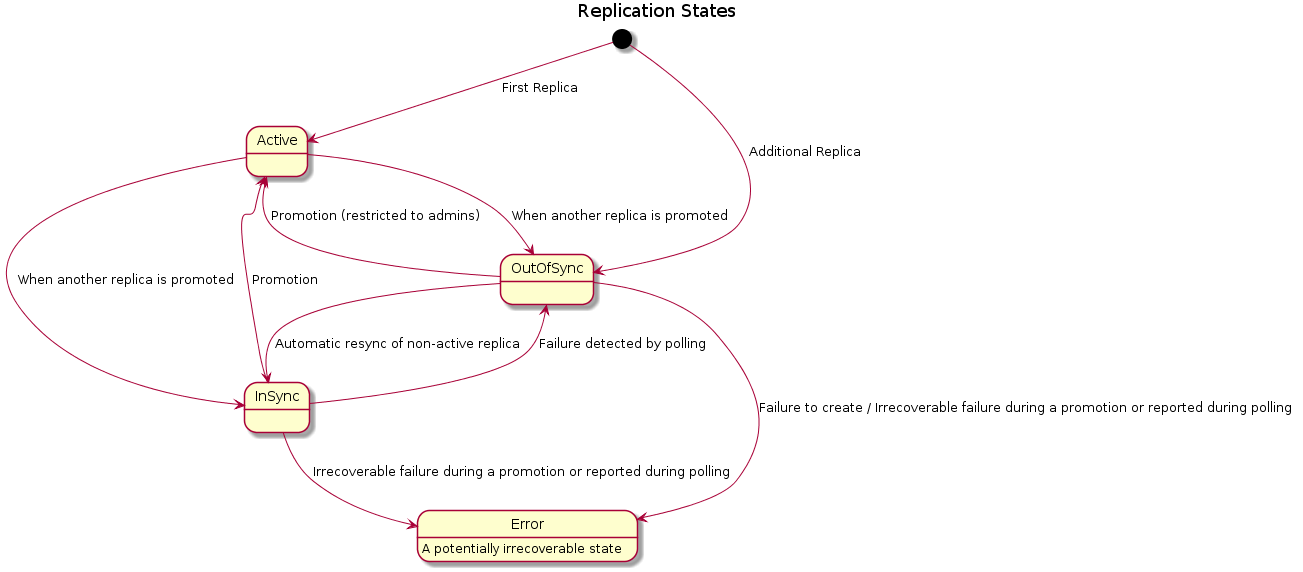
replication_change - 由活动副本的更改触发的新瞬态状态。在此状态下,将切断对共享的访问。
晋升
对于 readable 和 dr 风格,我们将切换非活动副本与 active 副本的任务称为 promotion。对于 writable 风格的复制,promotion 没有意义,因为所有副本在任何给定时间点都是 active(可写)。 尝试晋升 replica_state 设置为 out_of_sync 或 error 的副本可能不受后端支持。但是,我们希望允许此操作作为管理员功能,并且如果可能,后端可能会尊重这种尝试。
当存在多个副本时,可能需要在后端重新定义多个共享之间的复制关系。如果驱动程序在此阶段失败,副本可能会处于不一致的状态。管理器会将所有副本实例设置为具有 replica_state 和 status 为 error。从这个阶段恢复需要管理员干预。
用户工作流
- 管理员可以创建一个带有 extra-spec replication_type 的共享类型,指定后端支持的复制风格。
- 用户可以使用共享类型来创建允许/支持复制的新共享。
- 复制的共享始终从一个副本实例开始,即共享本身。这不应与共享已经具有副本混淆。用户可以通过请求共享的详细信息来验证共享是否有任何副本。
创建副本
- POST 到 /share-replicas
用户必须指定要复制的共享的名称/id,副本存在的可用性区域以及可选的 share_network_id。根据现有设计,共享的副本不能存在于与共享相同的可用性区域。
- 新创建的 share_replica 从 out_of_sync 状态开始,并且当驱动程序报告此状态时,可能会过渡到 in_sync 状态。
列出和显示副本
- GET 从 /share-replicas
用户可以列出所有副本并验证它们的 status 和 replica_state。
- GET 从 /share-replicas?share_id=<share_id>
用户可以列出特定共享的副本。
- GET 从 /share-replicas/<id>
用户可以查看副本的详细信息。
晋升非活动副本
- POST 到 /share-replicas/action,body 为 {'promote': None}
对于允许晋升的复制类型,用户可以通过启动 promote_replica 调用,将具有 in_sync replica_state 的副本晋升到 active replica_state。
- 只有管理员才能尝试晋升具有 replica_state error 或 out_of_sync 的副本。
删除副本
- DELETE 到 /share-replicas/<id>
用户可以删除副本。不能使用此 delete_replica 调用删除最后一个 active 副本。
系统工作流
- 创建支持复制的共享
- 与创建新共享的过程相同。
- 共享类型中的 replication_type extra-spec 复制到 DB 上的共享s 数据。
- 调度器使用 replication_type extra-spec 过滤可用主机,并在适当支持该特定 replication_type 风格的后端上调度共享。
- 创建副本
- 在数据库上创建一个共享实例。
- 将共享实例 replica_state 更新为 out_of_sync。
- 向调度器发出调用,以查找合适的宿主机来调度副本。
- 在调度器中,找到副本的加权宿主机。
- 如果无法选择宿主机,则将副本的 status 和 replica_state 更新为数据库中的 error。抛出异常。
- 根据加权宿主机选择,向驱动程序发出 create_share_replica 调用。
- 在调用驱动程序之前,整理有关现有 active 副本实例、现有共享访问规则以及副本的 share_server 的信息,并在调用 create_replica 时将这些信息传递给驱动程序。
- 驱动程序可以返回 export_locations 和 replica_state。如果返回它们,则数据库将使用这些值进行更新。
- 如果 replication_type 是 writable,则驱动程序必须将 replica_state 设置为 active。
- 所有新副本的访问规则都设置为数据库中的 active 状态。
- 驱动程序可以抛出异常,更新副本的 status 和 replica_state 为 error。
- 列出/显示共享
- 对于支持复制的共享,列出/显示共享的结果将具有新的字段,replication_type:表示支持的复制风格,以及 has_replicas,表示共享是否有副本。
- 对于复制的共享,主实例必须优先于那些具有 replication_change 状态或具有 replica_state 设置为 active 的那些副本。
- 列出副本
- 对于列出,从数据库中获取具有 replica_state 在 {in_sync, active, out_of_sync, error} 中的共享实例。
- 如果提供了 share_id,则仅获取属于该共享并具有 replica_state 在 {in_sync, active, out_of_sync, error} 中的共享实例。
- 必须尊重列表调用中的限制和偏移量。
- 晋升非活动副本
- 如果副本已经处于活动状态,则无需执行任何操作。
- 将正在晋升的副本的 status 更新为 replication_change。
- 获取所有可用副本并调用适当的驱动程序s promote_replica 调用,传递可用的副本和新的副本。
- 如果驱动程序在此阶段抛出异常,则很有可能后端上的副本已以某种方式更改。循环遍历副本并将它们的 replica_states 设置为 error,并保持 status 不变。还将未能晋升的副本的 status 设置为 available,就像在此操作之前一样。后端可以在副本监控调用期间选择更新实际的 replica_state。
- 驱动程序可以返回更新的副本列表。将 export_locations 和 replica_states 更新到数据库。
- 已晋升副本的 status 应从 replication_change 返回到 available。
- 定期副本更新
- 共享管理器实现了一个循环调用,默认间隔为 5 分钟,以查询每个驱动程序和后端,获取与它们关联的所有非活动副本的 replica_state。
- 驱动程序允许将 replica_state 设置为 in_sync、out_of_sync,以及在特殊情况下,error。
- 如果驱动程序将副本的 replica_state 设置为 error,则假定副本实例发生了一些不可恢复的损坏。副本实例的 status 也必须设置为 error。
- 删除共享副本
- 如果副本没有宿主机,则只需从数据库中删除它。
- 副本的 status 设置为数据库中的 deleting,并调用适当的驱动程序方法来删除副本。
- 如果驱动程序未能删除副本,则副本的 status 更新为数据库中的 error_deleting。
- 如果驱动程序返回而没有错误,则副本实例将从数据库中删除。
调度器影响
- host_manager 必须更新来自后端的 replication_type 功能。后端必须在主机/池级别报告此功能。
- filter_scheduler 必须将 replication_type 功能与复制共享类型要求的capability 匹配。
- replication_type 必须是上述提到的风格之一。
数据库影响
- 共享导出位置
首选导出位置仅来自具有 replica_state 设置为 active 的实例。
 def export_locations(self):
     # TODO(gouthamr): Return AZ specific export locations for replicated
     #  shares
     # NOTE(gouthamr): For a replicated share, export locations of the
     # 'active' instances are taken, if 'available'.
     all_export_locations = []
     select_instances = list(filter(
         lambda x: x['replica_state'] == constants.REPLICA_STATE_ACTIVE,
         self.instances)) or self.instances
     for instance in select_instances:
         if instance['status'] == constants.STATUS_AVAILABLE:
             for export_location in instance.export_locations:
                 all_export_locations.append(export_location['path'])
   return all_export_locations
- 共享实例
首选实例将是具有 status 设置为 replication_change 或任何具有 status 设置为 available 且 replica_state 设置为 active 的实例。
 def instance(self):
  # NOTE(gouthamr): The order of preference: status 'replication_change',
  # followed  by 'available' and 'creating'. If replicated share and
  # not undergoing a 'replication_change', only 'active' instances are
  # preferred.
  result = None
  if len(self.instances) > 0:
      order = [constants.STATUS_REPLICATION_CHANGE,
               constants.STATUS_AVAILABLE, constants.STATUS_CREATING]
      other_statuses = ([x['status'] for x in self.instances
                         if x['status'] not in order])
      order.extend(other_statuses)
      sorted_instances = sorted(
          self.instances, key=lambda x: order.index(x['status']))
      select_instances = sorted_instances
      if (select_instances[0]['status'] !=
              constants.STATUS_REPLICATION_CHANGE):
          select_instances = (
              list(filter(lambda x: x['replica_state'] ==
                          constants.REPLICA_STATE_ACTIVE,
                          sorted_instances)) or sorted_instances
          )
      result = select_instances[0]
  return result
- 共享上的新字段
replication_type = Column(String(255), nullable=True)
- 共享实例上的新字段
replica_state = Column(String(255), nullable=True)
API 设计
 GET /share-replicas/
 GET /share-replicas?share-id=<share_id>
 GET /share-replicas/<replica_id>
 POST /share-replicas/<share-id>
 Body:
 {
   'share_replica':
   {
     'availability_zone':<availability_zone_id>,
     'share_id':<share_id>,
     'share_network_id':<share_network_id>
   }
 }
 POST /share-replicas/<replica-id>/action
 Body:
 {'os-promote_replica': null}
DELETE /share-replicas/<replica-id>
政策
policy.json - 所有复制组策略应默认为默认策略
   "share_replica:get_all": "rule:default",
   "share_replica:show": "rule:default",
   "share_replica:create" : "rule:default",
   "share_replica:delete": "rule:default",
   "share_replica:promote": "rule:default"
驱动API
对于给定的共享,一次只会调用一个复制驱动程序方法,因为它们通过共享 id 锁定。驱动程序不应向管理器引发任何这些方法的错误。如果驱动程序遇到问题,它应尝试返回正确的模型更新,并设置正确的错误状态以表示资源的实际状态。驱动程序引发异常将导致所有副本处于错误状态,replica_state 不变。
 def create_replica(self, context, active_replica, new_replica,
                  access_rules, share_server=None):
     """Replicate the active replica to a new replica on this backend.
     :param context: Current context
     :param active_replica: A current active replica instance dictionary.
         EXAMPLE:
          .. code::
         {
         'id': 'd487b88d-e428-4230-a465-a800c2cce5f8',
         'share_id': 'f0e4bb5e-65f0-11e5-9d70-feff819cdc9f',
         'deleted': False,
         'host': 'openstack2@cmodeSSVMNFS1',
         'status': 'available',
         'scheduled_at': datetime.datetime(2015, 8, 10, 0, 5, 58),
         'launched_at': datetime.datetime(2015, 8, 10, 0, 5, 58),
         'terminated_at': None,
         'replica_state': 'active',
         'availability_zone_id': 'e2c2db5c-cb2f-4697-9966-c06fb200cb80',
         'export_locations': [
             <models.ShareInstanceExportLocations>._as_dict()
         ],
         'share_network_id': '4ccd5318-65f1-11e5-9d70-feff819cdc9f',
         'share_server_id': '4ce78e7b-0ef6-4730-ac2a-fd2defefbd05',
         'share_server': <models.ShareServer>._as_dict() or None,
         }
     :param new_replica: The share replica dictionary.
         EXAMPLE:
          .. code::
         {
         'id': 'e82ff8b6-65f0-11e5-9d70-feff819cdc9f',
         'share_id': 'f0e4bb5e-65f0-11e5-9d70-feff819cdc9f',
         'deleted': False,
         'host': 'openstack2@cmodeSSVMNFS2',
         'status': 'available',
         'scheduled_at': datetime.datetime(2015, 8, 10, 0, 5, 58),
         'launched_at': datetime.datetime(2015, 8, 10, 0, 5, 58),
         'terminated_at': None,
         'replica_state': 'out_of_sync',
         'availability_zone_id': 'f6e146d0-65f0-11e5-9d70-feff819cdc9f',
         'export_locations': [
             models.ShareInstanceExportLocations._as_dict()
         ],
         'share_network_id': '4ccd5318-65f1-11e5-9d70-feff819cdc9f',
         'share_server_id': 'e6155221-ea00-49ef-abf9-9f89b7dd900a',
         'share_server': <models.ShareServer>._as_dict() or None,
         }
     :param access_rules: A list of access rules that other instances of
     the share already obey.
     EXAMPLE:
          .. code::
          [ {
          'id': 'f0875f6f-766b-4865-8b41-cccb4cdf1676',
          'deleted' = False,
          'share_id' = 'f0e4bb5e-65f0-11e5-9d70-feff819cdc9f',
          'access_type' = 'ip',
          'access_to' = '172.16.20.1',
          'access_level' = 'rw',
          }]
     :param share_server: <models.ShareServer>._as_dict() or None,
     Share server of the replica being created.
     :return: (export_locations, replica_state)
     export_locations is a list of paths and replica_state is one of
     active, in-sync, out-of-sync or error.
     A backend supporting 'writable' type replication should return
     'active' as the replica_state.
     Export locations should be in the same format as returned by a
     share_create. This list may be empty or None.
         EXAMPLE:
         .. code::
             [{'id': 'uuid', 'export_locations': ['export_path']}]
     """
     raise NotImplementedError()
   def delete_replica(self, context, active_replica, replica,
                  share_server=None):
     """Delete a replica.
     :param context:Current context
     :param active_replica: A current active replica instance dictionary.
         EXAMPLE:
          .. code::
         {
         'id': 'd487b88d-e428-4230-a465-a800c2cce5f8',
         'share_id': 'f0e4bb5e-65f0-11e5-9d70-feff819cdc9f',
         'deleted': False,
         'host': 'openstack2@cmodeSSVMNFS1',
         'status': 'available',
         'scheduled_at': datetime.datetime(2015, 8, 10, 0, 5, 58),
         'launched_at': datetime.datetime(2015, 8, 10, 0, 5, 58),
         'terminated_at': None,
         'replica_state': 'active',
         'availability_zone_id': 'e2c2db5c-cb2f-4697-9966-c06fb200cb80',
         'export_locations': [
             models.ShareInstanceExportLocations._as_dict()
         ],
         'share_network_id': '4ccd5318-65f1-11e5-9d70-feff819cdc9f',
         'share_server_id': '4ce78e7b-0ef6-4730-ac2a-fd2defefbd05',
         'share_server': <models.ShareServer>._as_dict() or None,
         }
     :param replica: Dictionary of the share replica being deleted.
         EXAMPLE:
          .. code::
         {
         'id': 'e82ff8b6-65f0-11e5-9d70-feff819cdc9f',
         'share_id': 'f0e4bb5e-65f0-11e5-9d70-feff819cdc9f',
         'deleted': False,
         'host': 'openstack2@cmodeSSVMNFS2',
         'status': 'available',
         'scheduled_at': datetime.datetime(2015, 8, 10, 0, 5, 58),
         'launched_at': datetime.datetime(2015, 8, 10, 0, 5, 58),
         'terminated_at': None,
         'replica_state': 'in_sync',
         'availability_zone_id': 'f6e146d0-65f0-11e5-9d70-feff819cdc9f',
         'export_locations': [
             models.ShareInstanceExportLocations._as_dict()
         ],
         'share_network_id': '4ccd5318-65f1-11e5-9d70-feff819cdc9f',
         'share_server_id': '53099868-65f1-11e5-9d70-feff819cdc9f',
         'share_server': <models.ShareServer>._as_dict() or None,
         }
     :param share_server: <models.ShareServer>._as_dict() or None,
     Share server of the replica to be deleted.
     :return: None.
     """
     raise NotImplementedError()
   def promote_replica(self, context, replica_list, replica, access_rules, share_server=None):
     """Promote a replica to 'active' replica state.
     :param context:Current context
     :param replica_list: List of all replicas for a particular share.
     This list also contains the replica to be promoted. The 'active'
     replica will have its 'replica_state' attr set to 'active'.
         EXAMPLE:
          .. code::
         [
             {
             'id': 'd487b88d-e428-4230-a465-a800c2cce5f8',
             'share_id': 'f0e4bb5e-65f0-11e5-9d70-feff819cdc9f',
             'replica_state': 'in-sync',
                 ...
             'share_server_id': '4ce78e7b-0ef6-4730-ac2a-fd2defefbd05',
             'share_server': <models.ShareServer>._as_dict() or None,
             },
             {
             'id': '10e49c3e-aca9-483b-8c2d-1c337b38d6af',
             'share_id': 'f0e4bb5e-65f0-11e5-9d70-feff819cdc9f',
             'replica_state': 'active',
                 ...
             'share_server_id': 'f63629b3-e126-4448-bec2-03f788f76094',
             'share_server': <models.ShareServer>._as_dict() or None,
             },
             {
             'id': 'e82ff8b6-65f0-11e5-9d70-feff819cdc9f',
             'share_id': 'f0e4bb5e-65f0-11e5-9d70-feff819cdc9f',
             'replica_state': 'in-sync',
                 ...
             'share_server_id': '07574742-67ea-4dfd-9844-9fbd8ada3d87',
             'share_server': <models.ShareServer>._as_dict() or None,
             },
             ...
         ]
     :param replica: Dictionary of the replica to be promoted.
         EXAMPLE:
          .. code::
         {
         'id': 'e82ff8b6-65f0-11e5-9d70-feff819cdc9f',
         'share_id': 'f0e4bb5e-65f0-11e5-9d70-feff819cdc9f',
         'deleted': False,
         'host': 'openstack2@cmodeSSVMNFS2',
         'status': 'available',
         'scheduled_at': datetime.datetime(2015, 8, 10, 0, 5, 58),
         'launched_at': datetime.datetime(2015, 8, 10, 0, 5, 58),
         'terminated_at': None,
         'replica_state': 'in_sync',
         'availability_zone_id': 'f6e146d0-65f0-11e5-9d70-feff819cdc9f',
         'export_locations': [
             models.ShareInstanceExportLocations._as_dict()
         ],
         'share_network_id': '4ccd5318-65f1-11e5-9d70-feff819cdc9f',
         'share_server_id': '07574742-67ea-4dfd-9844-9fbd8ada3d87',
         'share_server': <models.ShareServer>._as_dict() or None,
         }
     :param access_rules: A list of access rules that other instances of
     the share already obey.
     EXAMPLE:
          .. code::
          [ {
          'id': 'f0875f6f-766b-4865-8b41-cccb4cdf1676',
          'deleted' = False,
          'share_id' = 'f0e4bb5e-65f0-11e5-9d70-feff819cdc9f',
          'access_type' = 'ip',
          'access_to' = '172.16.20.1',
          'access_level' = 'rw',
          }]
     :param share_server: <models.ShareServer>._as_dict() or None,
     Share server of the replica to be promoted.
     :return: updated_replica_list or None
         The driver can return the updated list as in the request
         parameter. Changes that will be updated to the Database are:
         'export_locations' and 'replica_state'.
     :raises Exception
         This can be any exception derived from BaseException. This is
         re-raised by the manager after some necessary cleanup. If the
         driver raises an exception during promotion, it is assumed
         that all of the replicas of the share are in an inconsistent
         state. Recovery is only possible through the periodic update
         call and/or administrator intervention to correct the 'status'
         of the affected replicas if they become healthy again.
     """
     raise NotImplementedError()
     def update_replica_state(self, context, replica, share_server=None):
       """Update the replica_state of a replica.
       Drivers should fix replication relationships that were broken if
       possible inside this method.
       :param context:Current context
       :param replica: Dictionary of the replica being updated.
           EXAMPLE:
            .. code::
           {
           'id': 'd487b88d-e428-4230-a465-a800c2cce5f8',
           'share_id': 'f0e4bb5e-65f0-11e5-9d70-feff819cdc9f',
           'deleted': False,
           'host': 'openstack2@cmodeSSVMNFS1',
           'status': 'available',
           'scheduled_at': datetime.datetime(2015, 8, 10, 0, 5, 58),
           'launched_at': datetime.datetime(2015, 8, 10, 0, 5, 58),
           'terminated_at': None,
           'replica_state': 'active',
           'availability_zone_id': 'e2c2db5c-cb2f-4697-9966-c06fb200cb80',
           'export_locations': [
               models.ShareInstanceExportLocations._as_dict()
           ],
           'share_network_id': '4ccd5318-65f1-11e5-9d70-feff819cdc9f',
           'share_server_id': '4ce78e7b-0ef6-4730-ac2a-fd2defefbd05',
           }
       :param share_server: <models.ShareServer>._as_dict() or None
       :return: replica_state
           replica_state - a str value denoting the replica_state that the
           replica can have. Valid values are 'in_sync' and 'out_of_sync'
           or None (to leave the current replica_state unchanged).
       """
       raise NotImplementedError()
Manila 客户端
   share-replica-create Creates a replica
   share-replica-delete Remove one or more share replicas.
   share-replica-list  List share replicas.
   share-replica-promote Promote replica to active replica.
   share-replica-show  Show details about a replica.
配置选项
replica_state_update_interval 此值(以秒为单位)确定共享管理器将多久轮询一次每个驱动程序和后端,以获取每个非活动副本的健康状况(replica_state)。
第一方驱动
DR 需要第一方驱动程序支持才能从实验功能中提升为两个主要原因。
- 如果只有单个供应商可以开发它,由于它仅受专有驱动程序支持,则该功能实际上不是开放的。
- 为了确保功能的质量,必须在 upstream gate 中对其进行测试。
常见问题解答
- 如何处理多 SVM 复制中的网络问题?
如果我们选择使复制成为仅单 SVM 功能,则无需更改共享网络 API。为了支持使用共享网络的复制,我们还需要修改共享网络创建 API,该 API 允许创建带有 AZ 到子网映射表的共享网络。这种方法允许我们为每个共享保留单个共享网络(具有关联的安全服务),同时允许租户指定足够的信息,以便每个共享实例可以附加到每个 AZ 中的适当网络。多 AZ 共享网络对于非复制用例也很有用。 - 我们是否支持池级别复制?
一些供应商建议某些后端可以比单个共享更有效地镜像一组共享或整个池。此设计仅解决单个共享的镜像。将来,我们可能会允许复制一组共享,但前提是这些组包含在单个租户中并由租户定义。 - 从哪里到哪里允许复制?是云内还是云间?我们是否允许复制到不由 Manila 管理的内容?
云内。复制到 Manila 之外的内容允许更大的自由度,但价值却大大降低,因为我们几乎无法自动化灾难的故障转移/故障恢复部分。对于涉及 Manila 之外复制的用例,我们需要涉及具有更广泛/范围的其他工具来管理该过程。 - 谁配置复制?管理员?最终用户?Manila 调度器?
最终用户。在原始设计中,我们认为实际的复制关系应隐藏在最终用户之外,但这与我们添加到 Manila 的 AZ 概念不符。如果用户需要控制其数据的原始副本位于哪个 AZ,那么他们也需要控制其他副本位于哪里。这意味着管理员的任务是确保对于任何已复制的共享类型,都可以从任何 AZ 复制到任何其他 AZ。 - 复制是否仅支持区域内或区域间?AZ 内和 AZ 之间的复制如何?
此设计仅适用于区域内。区域间复制是我们希望的功能,但它与区域内复制将大不相同;此设计不涵盖该方面。但是,支持可用区内复制,但建议使用可用区间复制,因为应将可用区视为故障域。
未回答的问题
- 有没有办法实现不中断的故障转移?
(bswartz) 我很希望发现我们最初的直觉是错误的,因为这将改变设计的很多方面。值得花时间集思广益并研究这方面的可能性。到目前为止,最有希望的想法包括- 使用 VirtFS 来调解文件系统访问,并以此实现非破坏性故障转移
- 在客户机内部使用某种代理来调解文件访问
- 副本是否可以使用不同的 share_type?用户可能希望在具有与原始 share 所在后端不同功能能力的后端上创建 share 副本,这是一种有效的使用场景。例如,副本可能需要在成本较低的后端上。在这种情况下,副本是否可以使用完全不同的 share_type?
“目前”,我们继承共享的 share_type,并认为复制必须在对称的条件下进行,即两个后端都具有类似的功能。 - 我们是否允许驱动程序限制可用后端之间的复制支持?后端可能仅支持与其他兼容后端进行复制。因此,它们必须向调度器报告某种信息,以便在为现有 share 创建副本时,调度器可以使用该信息来安排副本的创建。应该是什么信息?
(gouthamr) 我们正在研究在 ReplicationFilter 中包含 'driver_class_name',包括后端报告的配置 'replication_partners' 的可能性。 - 访问规则如何在副本/share 实例之间持久化?
- 所有副本是否应用相同的访问规则?(gouthamr):目前正在研究中
- 访问规则是否仅应用于“活动”副本?
- 迁移如何影响复制的 share?
- (gouthamr) 在东京峰会上,决定目前不允许迁移具有副本的 share。必须在迁移完成后中断并重新建立复制关系,才能迁移具有副本的 share。
- (gouthamr) 在东京峰会上,决定目前不允许迁移具有副本的 share。必须在迁移完成后中断并重新建立复制关系,才能迁移具有副本的 share。
- 我们需要一个 API 来启动同步吗?(重新同步或强制更新)
这是一个好主意,并且在计划的故障转移期间,这是一种特定的使用场景。(gouthamr) - 如何从提升失败中恢复?
(gouthamr) 目前,如果驱动程序级别发生某些异常,副本将变得无用。我们是否应该提供逃生舱口,以避免完全丢失,以防这些异常是可恢复的?管理员有能力“重置状态”并影响任何副本的“状态”。目前,不存在用于“重置副本状态”的 API。
示例
这些示例假定副本存在于不同的可用区中。
可写复制示例
- 管理员在具有 replication_type=writeable 功能的可用区 b1 和 b2 中设置后端
- 管理员创建一个名为 foo 的新 share_type
- 管理员将 replication_type=writeable 额外规范设置为 share type foo
- 用户在 AZ b1 中创建类型为 foo 的新 share
- Share 创建了 replication_type=writeable,并在 AZ b1 中拥有 1 个活动副本
- 用户在 AZ b1 中向 share 授予 client1 的访问权限,获取副本的导出位置,将 share 挂载到客户端,并开始写入数据
- 用户在 AZ b2 中添加 share 的新副本
- 在 AZ b2 中创建第二个副本,最初状态为 out_of_sync
- 稍后,副本状态更改为 active(在副本完成与原始副本同步后)
- 用户在 AZ b2 中向 share 授予 client2 的访问权限,获取新副本的导出位置,挂载 share,并看到 client1 写入的相同数据
- Client2 向 share 写入一些数据,这些数据立即对 client1 可见
可读复制示例
- 管理员在具有 replication_type=readable 功能的可用区 b1 和 b2 中设置后端
- 管理员创建一个名为 bar 的新 share_type
- 管理员将 replication_type=readable 额外规范设置为 share type bar
- 用户在 AZ b1 中创建类型为 bar 的新 share
- Share 创建了 replication_type=readable,并在 AZ b1 中拥有 1 个活动副本
- 用户在 AZ b1 中向 share 授予 client1 的访问权限,获取副本的导出位置,将 share 挂载到客户端,并开始写入数据
- 用户在 AZ b2 中添加 share 的新副本
- 在 AZ b2 中创建第二个副本,最初状态为 out_of_sync
- 稍后,副本状态更改为 in_sync(在副本完成与原始副本同步后)
- 用户在 AZ b2 中向 share 授予 client2 的访问权限,获取新副本的导出位置,挂载 share,并看到 client1 写入的相同数据
- Client2 无法向 share 写入数据,但仍可以继续查看更新
故障转移/故障恢复示例
(从以上内容继续)
- AZ b1 发生故障
- 管理员向他的用户发送有关故障的公告“b1 中的变压器烧毁了,要更换它需要 12 个小时,请耐心等待,等等”
- 用户注意到他的应用程序在 client1 上不再运行,并进行了调查
- 用户发现 client1 已经消失,并阅读了管理员解释原因的公告
- 用户注意到他的 share 的 b1 副本仍然处于活动状态,而 b2 副本处于 in_sync 状态,并且 share 的状态可用
- 用户调用将 share 的活动副本设置为 AZ b2
- share 进入 replication_change 状态,并且在 client2 上访问 share 会暂时中断
- 在 Manila 无法联系到原始主副本后,副本 b2 的状态更改为 active,副本 b1 的状态更改为 out_of_sync。share 的状态恢复为可用,并且在 client2 上恢复了访问权限
- 用户在 client2 上启动他的应用程序,应用程序从看似崩溃中恢复,并具有应用程序数据的一致副本
- 用户应用程序已恢复并正在运行,灾难已避免
- 最终,b1 AZ 的维护完成,并且所有设备都已重新激活
- 管理员向他的用户发送有关故障结束的公告“我们用更好的变压器替换了它,一切都已恢复在线,感谢您的理解,等等”
- Manila 注意到 out_of_sync 副本可访问,并启动重新同步,在短时间内使 b1 副本 in_sync
- 一段时间后,用户阅读公告并观察到他的 share 正在再次复制。他决定故意返回 b1。
- 用户优雅地关闭他的应用程序并刷新 I/O
- 用户调用将 share 的活动副本设置为 AZ b1
- share 进入 replication_change 状态,并且由于应用程序已关闭,因此没有观察到任何中断
- 在 Manila 再次反转复制后,副本 b1 的状态更改为 active,副本 b2 的状态更改为 in_sync。share 的状态恢复为可用
- 用户在 client1 上启动他的应用程序,应用程序干净地启动,因为已优雅地关闭
实施进度
核心工作
 Blueprint for Core API/Scheduler implementation
 Blueprint for Client implementation
Ex 驱动程序实现
Blueprint for cDOT Driver Implementation

