
Heat/Blueprints/hot-software-config-spec
目录
背景
此页面展示了 HOT 软件配置功能的正在进行中的设计。它应被视为先前 hot-software-config 提案的演进,但考虑了最近在香港 OpenStack 会议上的设计讨论结果。这个改进后的提案被捕获在一个新的 wiki 页面中,以提高可读性。一旦设计完成,我们将把各个 wiki 页面合并成一个。
讨论页面: https://wiki.openstack.org/wiki/Talk:Heat/hot-software-config-spec
需求
在设计讨论期间,已经提出了一些需求,它们也在 设计峰会 etherpad 中记录下来。本设计提案需要解决的最重要的需求总结如下。
- 可组合性和重用性: 必须能够定义软件组件一次,并在不同的上下文中组合和重用它们,而无需重复定义。
- 组件定义与部署的分离: 必须能够定义软件组件的多个部署,例如,一次定义的软件组件必须能够在模板中的不同服务器上部署。
- 软件组件作为有状态实体: 必须能够跟踪软件组件的状态,即软件部署是正在进行中、已完成还是已失败。
- 引用软件组件输出: 必须能够检索软件组件的输出(属性)。
- 表达软件组件之间依赖关系的能力: 必须能够定义软件组件之间的依赖关系,例如,一个组件的输入是从另一个组件的输出获得的。
高级概述
可重用的软件组件被建模为 SoftwareConfig 资源。这些 SoftwareConfig 定义指向实际的自动化工具,以便稍后执行软件配置(例如,Chef、Puppet、脚本等),并且它们提供了一个通用的 SoftwareDeployment 资源来在服务器上部署给定软件所需的元数据。SoftwareDeployment 资源代表软件组件在模板中的一个实例,即一个具体的用途。它提供该部署的特定输入参数,它将提供该部署产生的输出,最重要的是,它将部署映射到特定的目标服务器。
假设将会有不同的可插拔实现用于 SoftwareConfig 和 SoftwareDeployment - 每个配置工具后端一个,例如 Chef、Puppet、脚本等 - 因为每个配置工具将对元数据和运行时实现有特定的要求。然而,假设许多常见行为可以通过 SoftwareConfig 和 SoftwareDeployment 的通用基类来覆盖,因此只需要针对各种 CM 工具的非常薄的插件(这是正在进行的设计工作)。
下图基于 WordPress 示例展示了这些概念。假设有用于配置 WordPress 应用程序和 MySQL 的 Chef cookbook。这些 cookbook 由两个 SoftwareConfig 资源引用,以及每个自动化的相应元数据。自动化加上相应的 SoftwareConfig 定义是可重用的实体;它们未映射到任何具体的部署目标,并且它们不定义特定的输入值。有两个 SoftwareDeployment 资源,一个用于 MySQL,一个用于 WordPress,每个资源将部署映射到单独的服务器。WordPress 部署和 MySQL 部署之间存在数据依赖关系(请参阅此页后面的代码片段),以获取有关 MySQL 数据库的端点信息,以便配置 WordPress 应用程序。
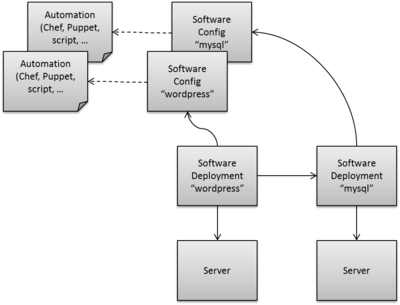
对于简单的模板,可以将所有元素(SoftwareConfig、SoftwareDeployment 和其他基本资源)定义在一个模板文件中。对于更复杂的场景,以及为了提高可组合性,可以将一部分资源拆分为单独的提供者模板,这些模板可以通过环境变量绑定。这在 打包以便作为提供者模板重用 部分中进行了更详细的说明,并附有示例代码片段。
软件配置
SoftwareConfig 资源包含自动化(例如 Chef cookbook、脚本等)的元数据定义,以及对实际自动化的引用。定义后,可以通过 ServerDeployment 资源(参见 软件部署)将其映射到一个或多个部署目标(服务器)。SoftwareConfig 定义是特定于所使用的软件配置工具的,因为它们提供特定于工具的元数据。以下示例显示了 Chef Software Config 资源的代码片段(完整的示例在 WordPress 一体化示例 部分中给出)
resources:
  wordpress_sw_config:
    type: OS::Heat::SoftwareConfig::Chef
    properties:
      cookbook: http://www.example.com/hot/chef/wordpress.zip
      role: wordpress
      # input parameters that the chef role(s) need
      inputs:
        wp_admin_user:
          type: string
          mapping: wordpress/admin_user
        wp_admin_pw:
          type: string
          mapping: wordpress/admin_password
        db_endpoint_url:
          type: string
          mapping: wordpress/db_url
        # more input parameters ...
      # output data that the chef automation produces
      outputs:
        wp_url:
          type: string
          mapping: wordpress/url
资源类型 OS::Heat::SoftwareConfig::Chef 指示这是一个 Chef 特定的 Software Config 定义。cookbook 属性指向使用的 Chef cookbook,而 role 属性指向通过此 Software Config 设置的角色。inputs 部分包含要传递给 Chef 以配置角色的输入参数的定义。输入参数根据名称和类型定义。此外,mapping 指定相应的输入参数需要分配给哪个角色属性(即 Chef 特定的元数据)。
outputs 部分定义了在软件部署完成后可以在运行时检索的属性。这些值将作为相应 SoftwareDeployment 资源的属性在运行时可用(参见 软件部署)。
软件部署
SoftwareDeployment 资源代表软件组件(通过 SoftwareConfig 资源定义)在模板中的一个具体用途。它指向应用于部署目标的 SoftwareConfig,并指向实际的部署目标(服务器)。与 SoftwareConfig 一样,假设 SoftwareDeployment 实现将特定于所使用的软件配置工具,因为需要在运行时执行特定于工具的步骤。
以下示例显示了使用 Chef 定义的 WordPress 组件的 SoftwareDeployment 定义。为了简洁起见,省略了总体模板参数、输出或其他资源的定义 - 请参阅 WordPress 一体化示例 部分以获取完整的示例
resources:
  wordpress_sw_config:
    type: OS::Heat::SoftwareConfig::Chef
    properties:
      # ...

  wordpress_deployment:
    type: OS::Heat::SoftwareDeployment::Chef
    properties:
      apply_config: { get_resource: wordpress_sw_config }
      server: { get_resource: wp_server }
      input_values:
        wp_admin_user: { get_param: wp_admin_user }
        wp_admin_pw: { get_param: wp_admin_pw }
        # more input parameters ...

  wp_server:
    type: OS::Nova::Server
    properties:
      # ...
wordpress_deployment 资源指向 wordpress_sw_config SoftwareConfig 资源,并指定其一个实例应部署到(应用于)服务器 wp_server。在 SoftwareDeployment 属性的 input_values 部分,提供了可配置参数的输入,例如,通过获取用户在部署时指定的全局模板参数。这些参数映射到前面显示的 wordpress_sw_config 资源中定义的参数。
在 wordpress_sw_config 资源中的 outputs 下定义的输出参数可以通过 get_attr 固有函数作为 wordpress_deployment 资源的属性进行观察。例如,以下 HOT 模板中的代码片段会将已部署 WordPress 应用程序的 URL 作为输出值传递给用户
outputs:
  wordpress_url:
    description: URL to access deployed Wordpress application
    value: { get_attr: [ wordpress_deployment, wp_url ]}
软件部署资源职责
Software Deployment 实现需要涵盖几个方面。首先,资源代码负责将元数据注入到引用的已部署目标(服务器)中,以便对相应的软件配置工具(Chef 等)进行引导。此外,资源负责在满足所有依赖关系时触发软件的部署(通过调用底层的软件配置工具)。软件部署完成后,资源必须将其状态更新为 CREATE_COMPLETE,以便通过 Heat 进行整体编排(或者必须通过适当的失败状态指示失败)。最后,与关联的 SoftwareConfig 资源指定的属性必须从底层的软件配置工具中获取,以便可以解析 get_attr 的使用。
软件部署之间的依赖关系
在许多情况下,软件部署依赖于其他软件部署。例如,WordPress 应用程序需要设置 MySQL 数据库来存储内容。声明软件部署之间依赖关系有两种方法:基于数据流和显式定义。
基于数据流
当一个 Software Deployment 的属性(输入)是从另一个 Software Deployment 的属性(输出)获得的,则两个 Software Deployment 之间存在基于数据流的依赖关系。Heat 引擎会隐式地强制执行两个 SoftwareDeployment 资源之间的依赖关系。例如
resources:
  wordpress_deployment:
    type: OS::Heat::SoftwareDeployment::Chef
    properties:
      apply_config: { get_resource: wordpress_sw_config }
      server: { get_resource: wp_server }
      input_values:
        wp_admin_user: { get_param: wp_admin_user }
        wp_admin_pw: { get_param: wp_admin_pw }
        db_endpoint_url: { get_attr: [ mysql_deployment, db_url ] }
        # more input parameters ...

  mysql_deployment:
    type: OS::Heat::SoftwareDeployment::Chef
    properties:
      apply_config: { get_resource: mysql_sw_config }
      server: { get_resource: db_server }
      input_values:
        # input parameters for MySQL deployment ...
将引入从 mysql_deployment 到 wordpress_deployment 的依赖关系,因为 wordpress_deployment 的一个属性是使用引用 mysql_deployment 资源的属性的 get_attr 函数设置的。因此,资源 mysql_deployment 必须处于 CREATE_COMPLETE 状态,然后才能开始处理资源 wordpress_deployment。完整的示例在 WordPress 一体化示例 部分中所示。
显式依赖
如果不存在数据依赖关系,但仍然存在时序依赖关系(例如,一个进程必须启动后,客户端才能连接到它),则需要一种声明显式依赖关系的机制。这可以通过显式地在 depends_on 子句中定义软件部署的依赖关系来解决,该子句是其他资源的资源 ID 列表,软件部署依赖于这些资源,例如
resources:
  client:
    type: OS::Heat::SoftwareDeployment::Chef
    properties:
      apply_config: { get_resource: client_sw_config }
      server: { get_resource: my_server }
      input_values:
        # params ...
    depends_on:
      - get_resource: server_process1
      - get_resource: server_process2

  server_process1:
    type: OS::Heat::SoftwareDeployment::Chef
    properties:
      apply_config: { get_resource: server_process1_sw_config }
      server: { get_resource: my_server }
      input_values:
        # params ...

  server_process2:
    type: OS::Heat::SoftwareDeployment::Chef
    properties:
      apply_config: { get_resource: server_process2_sw_config }
      server: { get_resource: my_server }
      input_values:
        # params ...

  my_server:
    type: OS::Nova::Server
    properties:
      # ...
在上面的示例中,client 依赖于 server_process1 和 server_process2 都已完成。
打包以便作为提供者模板重用
在迄今为止的描述中,概述了如何将 SoftwareConfig 和 SoftwareDeployment 用于 HOT 模板,以解决 Heat 中的软件编排。对于简单的示例或入门,可以将所有定义放在一个模板文件中。但是,为了使定义更具可重用性,或者在涉及更大、更复杂的场景时,将软件组件的定义拆分为单独的文件是有意义的。例如,与其在每个使用 WordPress 的模板中重复 WordPress 应用程序的 Software Config 定义(wordpress_sw_config 在上面的示例中),不如将其定义放在一个文件中,该文件可以作为提供者模板被其他模板利用。
一种可能的选项是,将 WordPress 应用程序的 SoftwareConfig 资源和 SoftwareDeployment 资源定义在一个单独的模板文件中,并在使用提供者模板时提供所有输入参数以及目标服务器的指针。相应的提供者模板如下面的代码片段所示(完整的示例在 使用可重用提供者模板的 WordPress 示例 部分中给出)
heat_template_version: 2013-05-23

parameters:
  wp_admin_user:
    description: Username of the Wordpress admin user.
    type: string
  wp_admin_pw:
    description: Password of the Wordpress admin user.
    type: string
  db_endpoint_url:
    description: Endpoint URL of the database to be used.
    type: string
  # more software related parameters ...

  server:
    description: Reference to server onto which to install Wordpress.
    type: string

resources:
  wordpress_sw_config:
    type: OS::Heat::SoftwareConfig::Chef
    properties:
      cookbook: http://www.example.com/hot/chef/wordpress.zip
      role: wordpress
      # input parameters that the chef role(s) need
      inputs:
        # ...
      # output data that the chef automation produces
      outputs:
        # ...

  wordpress_deployment:
    type: OS::Heat::SoftwareDeployment::Chef
    properties:
      apply_config: { get_resource: wordpress_sw_config }
      server: { get_param: server }
      input_values:
        wp_admin_user: { get_param: wp_admin_user }
        wp_admin_pw: { get_param: wp_admin_pw }
        db_endpoint_url: { get_param: db_endpoint_url }
        # ...

outputs:
  wordpress_url:
    description: URL to access deployed Wordpress application
    value: { get_attr: [ wordpress_deployment, wp_url ]}
请注意,即使 SoftwareDeployment 资源包含在提供者模板中,该定义仍然可重用,因为未定义任何服务器映射。在提供者模板被使用的地方,通过在模板的 parameters 部分定义 server 参数,并通过用户提供的参数初始化 wordpress_deployment 资源的 server 属性,来提供将 Software Deployment 映射到服务器的引用。
请注意,与将软件配置定义包含在实际模板文件中相比,在提供程序模板中定义它们不仅具有更好的可重用性,还提供了进行更丰富的输入参数验证的可能性,因为 HOT 模板的 `parameters` 部分通过可以为每个输入参数表达的 `constraints` 具有更像模式的表达能力。
使用与上述类似的单独文件中的 MySQL 可重用定义,实际部署的 HOT 模板可以像以下代码片段中概述的那样组合。
heat_template_version: 2013-05-23

parameters:
  # parameter definitions omitted for brevity

resources:
  wordpress:
    type: Software::Wordpress
    properties:
      server: { get_resource: wp_server }
      wp_admin_user: { get_param: wp_admin_user }
      wp_admin_pw: { get_param: wp_admin_pw }
      db_endpoint_url: { get_attr: [ mysql, db_endpoint_url ] }
      db_user: { get_param: db_user }
      db_pw: { get_param: db_pw }

  wp_server:
    type: OS::Nova::Server
    properties:
      image: { get_param: image }
      flavor: { get_param: flavor }

  mysql:
    type: Software::MySQL
    properties:
      server: { get_resource: db_server }
      db_user: { get_param: db_user }
      db_pw: { get_param: db_pw }
      db_name: { get_param: db_name }

  db_server:
    type: OS::Nova::Server
    properties:
      image: { get_param: image }
      flavor: { get_param: flavor }

outputs:
  wordpress_url:
    description: URL to access deployed Wordpress application
    value: { get_attr: [ wordpress_deployment, wp_url ]}
上述模板不再包含 Wordpress 和 MySQL 软件配置的详细定义,而只是定义了这两个软件组件的两个具体用途——`wordpress` 资源和 `mysql` 资源。每个用途的目标服务器以及特定的输入参数都作为这些资源的属性提供。
用于这两个资源的资源类型名称,`Software::Wordpress` 或 `Software::MySQL`,通过环境定义与各自的提供程序模板绑定。这还提供了更大的灵活性,因为可以在不同的环境中使用的提供程序模板不同,而无需更改模板。例如,可能存在适用于 Fedora 的软件的提供程序模板,也可能存在适用于 Ubuntu 的提供程序模板。
假设 Wordpress 组件的定义包含在名为 `wordpress_component.yaml` 的提供程序模板中,MySQL 的定义包含在名为 `mysql_component.yaml` 的文件中——两者都可在服务器上使用——相应的环境定义如下所示
resource_registry:
  "Software::Wordpress": http://www.example.com/hot/software/wordpress_component.yaml
  "Software::MySQL": http://www.example.com/hot/software/mysql_component.yaml
实现注意事项
本节仍在进行中,但目前或多或少是收集了一些想法。
可以使用 cloud-init 来启动软件配置工具。软件配置资源实现必须将相应的元数据注入到其托管的服务器资源定义中。
可以使用 `os-collect-config` 等实现来收集软件配置元数据等。
为了同步目的(例如,在存在显式依赖关系的情况下),可以在底层使用现有的机制(例如 WaitCondition 信号),但不会在模板中公开它们。
Wordpress 一体化示例
以下列表显示了前面引用的 Wordpress 示例作为完整的 HOT 模板。该模板包括所有软件配置定义、软件部署以及服务器资源(因此是一体化示例)。请注意,该示例并非旨在 100% 正确,以便在 Heat 中使用,而是旨在提供此 wiki 页面上描述的概念的完整端到端草案。
heat_template_version: 2013-05-23

description: >
  This is an all-in-one template for deployment of Wordpress and MySQL on two servers.
  The definition of software configs for Wordpress and MySQL as well as definition for
  deployment onto servers is contained in this single template file.

parameters:
  wp_admin_user:
    description: Username of the Wordpress admin user.
    type: string
  wp_admin_pw:
    description: Password of the Wordpress admin user.
    type: string
  db_user:
    description: Username of the database admin user.
    type: string
  db_pw:
    description: Password of the database admin user.
    type: string
  db_name:
    description: Database name for the Wordpress database.
    type: string
  image:
    description: Image to be used for servers.
    type: string
  flavor:
    description: Flavor to be used for servers.
    type: string

resources:
  wordpress_sw_config:
    type: OS::Heat::SoftwareConfig::Chef
    properties:
      cookbook: http://www.example.com/hot/chef/wordpress.zip
      role: wordpress
      # input parameters that the chef role(s) need
      inputs:
        wp_admin_user:
          type: string
          mapping: wordpress/admin_user
        wp_admin_pw:
          type: string
          mapping: wordpress/admin_password
        db_endpoint_url:
          type: string
          mapping: wordpress/db_url
        db_user:
          type: string
          mapping: wordpress/db_user
        db_pw:
          type: string
          mapping: wordpress/db_password
      # output data that the chef automation produces
      outputs:
        wp_url:
          type: string
          mapping: wordpress/url

  wordpress_deployment:
    type: OS::Heat::SoftwareDeployment::Chef
    properties:
      apply_config: { get_resource: wordpress_sw_config }
      server: { get_resource: wp_server }
      input_values:
        wp_admin_user: { get_param: wp_admin_user }
        wp_admin_pw: { get_param: wp_admin_pw }
        db_endpoint_url: { get_attr: [ mysql_deployment, db_url ] }
        db_user: { get_param: db_user }
        db_pw: { get_param: db_pw }

  wp_server:
    type: OS::Nova::Server
    properties:
      image: { get_param: image }
      flavor: { get_param: flavor }

  mysql_sw_config:
    type: OS::Heat::SoftwareConfig::Chef
    properties:
      cookbook: http://www.example.com/hot/chef/mysql.zip
      role: mysql-server
      # input parameters that the chef role(s) need
      inputs:
        db_name:
          type: string
          mapping: mysql-server/db_name
        db_user:
          type: string
          mapping: mysql-server/db_user
        db_pw:
          type: string
          mapping: mysql-server/db_password
      # output data that the chef automation produces
      outputs:
        db_endpoint_url:
          type: string
          mapping: mysql-server/db_url

  mysql_deployment:
    type: OS::Heat::SoftwareDeployment::Chef
    properties:
      apply_config: { get_resource: mysql_sw_config }
      server: { get_resource: db_server }
      input_values:
        db_name: { get_param: db_name }
        db_user: { get_param: db_user }
        db_pw: { get_param: db_pw }

  db_server:
    type: OS::Nova::Server
    properties:
      image: { get_param: image }
      flavor: { get_param: flavor }

outputs:
  wordpress_url:
    description: URL to access deployed Wordpress application
    value: { get_attr: [ wordpress_deployment, wp_url ]}
使用可重用提供程序模板的 Wordpress 示例
在章节 Wordpress 一体化示例 中,展示了一个将所有定义包含在一个文件中的 HOT 模板。本节列出了相同示例的完整定义,但将部分拆分为单独的 HOT 模板,这些模板可以作为提供程序模板使用,以实现更好的重用。
Wordpress 提供程序模板
wordpress_component.yaml
heat_template_version: 2013-05-23

description: >
  This template contains the definition of a Wordpress SoftwareConfig and
  corresponding SoftwareDeployment for re-use in other templates as a HOT
  provider template.

parameters:
  wp_admin_user:
    description: Username of the Wordpress admin user.
    type: string
  wp_admin_pw:
    description: Password of the Wordpress admin user.
    type: string
  db_endpoint_url:
    description: Endpoint URL of the database to be used.
    type: string
  db_user:
    description: Username to connect to the database.
    type: string
  db_pw:
    description: Password to connect to the database.
    type: string
  server:
    description: Reference to server onto which to install Wordpress.
    type: string

resources:
  wordpress_sw_config:
    type: OS::Heat::SoftwareConfig::Chef
    properties:
      cookbook: http://www.example.com/hot/chef/wordpress.zip
      role: wordpress
      # input parameters that the chef role(s) need
      inputs:
        wp_admin_user:
          type: string
          mapping: wordpress/admin_user
        wp_admin_pw:
          type: string
          mapping: wordpress/admin_password
        db_endpoint_url:
          type: string
          mapping: wordpress/db_url
        db_user:
          type: string
          mapping: wordpress/db_user
        db_pw:
          type: string
          mapping: wordpress/db_password
      # output data that the chef automation produces
      outputs:
        wp_url:
          type: string
          mapping: wordpress/url

  wordpress_deployment:
    type: OS::Heat::SoftwareDeployment::Chef
    properties:
      apply_config: { get_resource: wordpress_sw_config }
      server: { get_param: server }
      input_values:
        wp_admin_user: { get_param: wp_admin_user }
        wp_admin_pw: { get_param: wp_admin_pw }
        db_endpoint_url: { get_param: db_endpoint_url }
        db_user: { get_param: db_user }
        db_pw: { get_param: db_pw }

outputs:
  wordpress_url:
    description: URL to access deployed Wordpress application
    value: { get_attr: [ wordpress_deployment, wp_url ]}
MySQL 提供程序模板
mysql_component.yaml
heat_template_version: 2013-05-23

description: >
  This template contains the definition of a MySQL SoftwareConfig and
  corresponding SoftwareDeployment for re-use in other templates as a HOT
  provider template.

parameters:
  db_user:
    description: Username of the database admin user.
    type: string
  db_pw:
    description: Password of the database admin user.
    type: string
  db_name:
    description: Database name for the Wordpress database.
    type: string
  server:
    description: Reference to server onto which to install MySQL.
    type: string

resources:
  mysql_sw_config:
    type: OS::Heat::SoftwareConfig::Chef
    properties:
      cookbook: http://www.example.com/hot/chef/mysql.zip
      role: mysql-server
      # input parameters that the chef role(s) need
      inputs:
        db_name:
          type: string
          mapping: mysql-server/db_name
        db_user:
          type: string
          mapping: mysql-server/db_user
        db_pw:
          type: string
          mapping: mysql-server/db_password
      # output data that the chef automation produces
      outputs:
        db_endpoint_url:
          type: string
          mapping: mysql-server/db_url

  mysql_deployment:
    type: OS::Heat::SoftwareDeployment::Chef
    properties:
      apply_config: { get_resource: mysql_sw_config }
      server: { get_param: server }
      input_values:
        db_name: { get_param: db_name }
        db_user: { get_param: db_user }
        db_pw: { get_param: db_pw }

outputs:
  db_endpoint_url:
    description: Endpoint URL of the MySQL database.
    value: { get_attr: [ mysql_deployment, db_endpoint_url ]}
用于在两台服务器上部署 Wordpress 和 MySQL 的 HOT 模板
wp-with-provider-templates.yaml
heat_template_version: 2013-05-23

description: >
  This is a template for deployment of Wordpress and MySQL on two servers. The
  definition of the software configs for Wordpress and MySQL are contained in
  separate files that are bound as provider templates via the environment.

parameters:
  wp_admin_user:
    description: Username of the Wordpress admin user.
    type: string
  wp_admin_pw:
    description: Password of the Wordpress admin user.
    type: string
  db_user:
    description: Username of the database admin user.
    type: string
  db_pw:
    description: Password of the database admin user.
    type: string
  db_name:
    description: Database name for the Wordpress database.
    type: string
  image:
    description: Image to be used for servers.
    type: string
  flavor:
    description: Flavor to be used for servers.
    type: string

resources:
  wordpress:
    type: Software::Wordpress
    properties:
      server: { get_resource: wp_server }
      wp_admin_user: { get_param: wp_admin_user }
      wp_admin_pw: { get_param: wp_admin_pw }
      db_endpoint_url: { get_attr: [ mysql, db_endpoint_url ] }
      db_user: { get_param: db_user }
      db_pw: { get_param: db_pw }

  wp_server:
    type: OS::Nova::Server
    properties:
      image: { get_param: image }
      flavor: { get_param: flavor }

  mysql:
    type: Software::MySQL
    properties:
      server: { get_resource: db_server }
      db_user: { get_param: db_user }
      db_pw: { get_param: db_pw }
      db_name: { get_param: db_name }

  db_server:
    type: OS::Nova::Server
    properties:
      image: { get_param: image }
      flavor: { get_param: flavor }

outputs:
  wordpress_url:
    description: URL to access deployed Wordpress application
    value: { get_attr: [ wordpress_deployment, wp_url ]}
环境文件
wordpress-and-mysql-environment.yaml
resource_registry:
  "Software::Wordpress": http://www.example.com/hot/software/wordpress_component.yaml
  "Software::MySQL": http://www.example.com/hot/software/mysql_component.yaml

