
CloudInventoryManager

|
旧设计页面
此页面用于帮助设计已实现的功能。因此,此页面可能不会更新,并且可能包含过时的信息。上次更新时间为 2013-12-12 |
- Launchpad Entry: Cloud Inventory Manager
- 创建: 2012年4月2日
- 贡献者: Yehia Beyh, Lyle Wilkinson, Divakar Nandavar
目录
总结
为 OpenStack 云资源和基础设施向 Nova 提供一个可扩展的服务,用于包含云库存。Cloud Inventory Manager 提供对云资源系统信息的洞察,并利用底层虚拟化管理器(例如 libvirt)资源层次结构,例如集群、资源池、存储、网络和服务器池。
最终用户和系统管理员可以使用资源库存来构建可用集群、资源池、存储池、网络池和服务器池的目录。
- 资源详情提供通过虚拟化管理器(例如 libvirt)发现的资源。
- 资源信息保存在数据库中。根据需要,通过动态 REST API 查询获取详情
- 发现并监控由 OpenStack 或底层资源管理器引起的资源变更(添加/更新/删除)
- 显式建模可以分配给服务元素的资源,然后这些资源被组织成资源池
此外,此库存管理器为改进的调度器和资源分配实现奠定了基础,这将能够实现多租户公共和私有云资源管理。
发布说明
Cloud Inventory Manager 服务提供基于 OpenStack 扩展 API 模型中的 API。因此,现有用户不应受到影响。高级用户和云提供商可以利用资源库存数据进行分析、规划和配置决策。
有关更多详细信息,请参阅 API 说明。
原理
请注意,以下蓝图在 Nova 中引入了 Aggregates 的概念
Cloud Inventory Manager 服务将此概念从主机聚合扩展到其他通用云资源(例如,集群、资源池、主机、VM、存储、网络、子网、虚拟交换机、端口组)。请参阅下面的资源模型 UML 图。
用户故事
- 作为云管理员,我需要支持构建可用云资源目录。
- 作为云管理员,我需要支持基于容量、配额和资源组的云资源池的构建和维护。
- 作为云管理员,我需要支持查看资源库存、资源消耗、利用率历史记录和趋势。
- 作为云管理员,我需要支持导入尚未由 OpenStack 管理的现有服务器。
- 作为云用户或管理员,我需要云资源元数据来支持基础设施服务的配置、优化和持续管理。
- 作为云管理员,我需要支持分析、手动修改或自主修改基础设施服务,以提高其性能、资源使用率、资源消耗等。
前提条件
设计
Cloud Inventory Manager 是健康和监控服务架构的一部分,支持类似于其他 OpenStack 组件实现中的插件架构。该设计支持通过配置设置遵循 OpenStack 中的驱动程序模型来插入多个实现。它可以扩展以支持多种 Hypervisor 类型(例如:ESX、Hyper-V、KVM 等)。
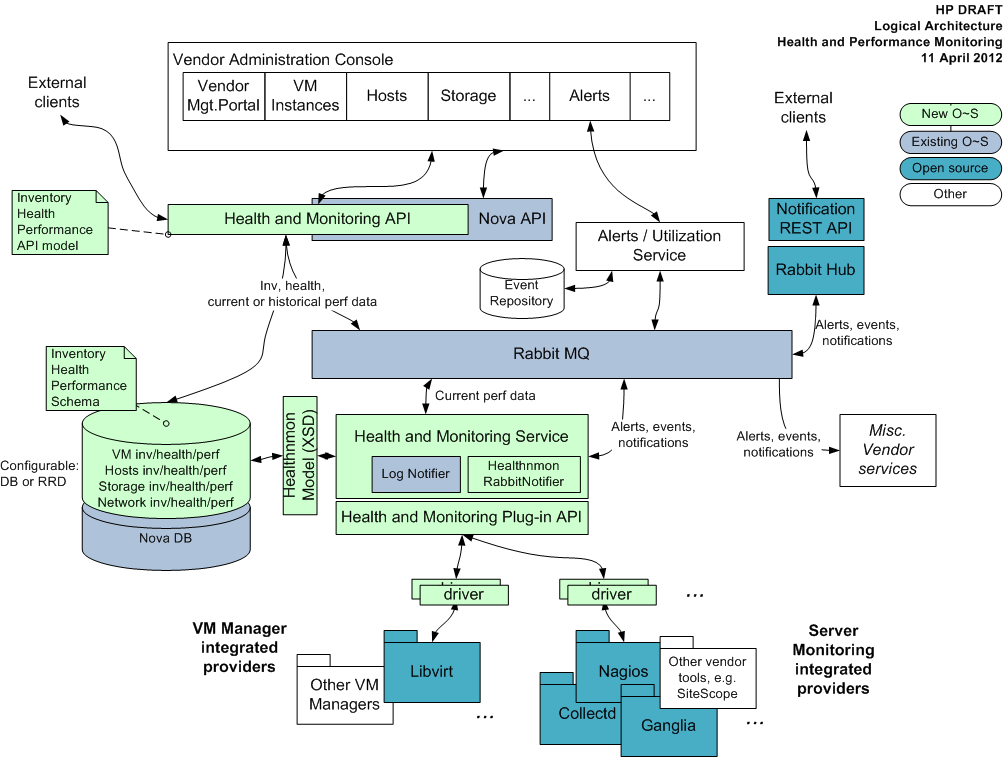
Cloud Inventory Manager 提供
- 基于驱动程序的插件模型,以支持多种实现
- 通过配置设置使用驱动程序模型插入,遵循 OpenStack 中的驱动程序模型。
- 支持插入多种 Hypervisor 类型(例如:ESX、Hyperv、KVM 等)的实现
- 用于以 Nova 扩展 API 形式进行编程访问的 REST API。
- 支持控制器和资源扩展。
- 基于资源模型(请参阅下面的资源模型 UML 图。请注意,Healthnmon XSD 是上述图中的资源模型)的库存数据(资源详情)。

实现
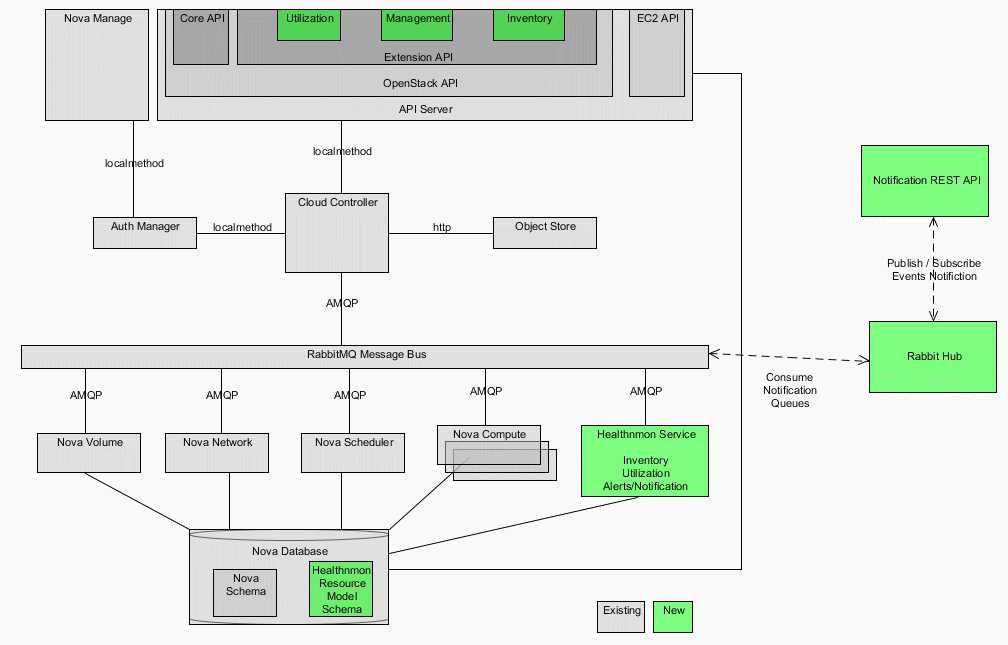
注意:为讨论起见,模块名称为“Healthnmon”,它实现了 Cloud Inventory 详情所需的全部功能。
架构
配置 nova 使用 healthnmon 扩展
将以下内容添加到 nova.conf 文件(/etc/nova/nova.conf)并重新启动 nova-api 服务器。
--osapi_compute_extension=healthnmon.api.healthnmon.Healthnmon
示例 Curl 用法
以下显示了使用创建的身份验证令牌以 XML 格式获取 vmhosts 列表的示例用法
curl -i -k -H "X-Auth-Token:novaadmin:admin" -H "Accept:application/xml" http://10.10.120.158:8774/v2/admin/vmhosts
扩展元数据
| 动词 | URI |
| GET | v2/{project_id}/extensions/healthnmon |
JSON 响应
{
  "extension" : {
    "updated" : "2012-01-22T13:25:27-06:00",
    "name" : "healthnmon",
    "links" : [],
    "namespace" : "https://docs.openstack.org/ext/healthnmon/api/v2.0",
    "alias" : "HP-HNM",
    "description" : " Health and monitoring API as nova compute extension API's\n    "
  }
}
XML 响应
<extension xmlns:atom="http://www.w3.org/2005/Atom"
	xmlns="https://docs.openstack.org/compute/api/v1.1" alias="HP-HNM"
	updated="2012-01-22T13:25:27-06:00" namespace="https://docs.openstack.org/ext/healthnmon/api/v2.0"
	name="healthnmon">
	<description> Health and monitoring API as nova compute extension API's
	</description>
</extension>
| 动词 | URI |
| GET | /clusters?name=clusterName&marker=markerID&limit=int&changes-since=dateTime |
| GET | /clusters/detail?name=clusterName&marker=markerID&limit=int&changes-since=dateTime |
| GET | /clusters/id |
| 动词 | URI |
| GET | /resourcepools?name=resourcepoolName&marker=markerID&limit=int&changes-since=dateTime |
| GET | /resourcepools/detail?name=clusterName&marker=markerID&limit=int&changes-since=dateTime |
| GET | /resourcepools/id |
| 动词 | URI |
| GET | /hosts?type=hostType&name=hostName&status=hostStatus&marker=markerID&limit=int&changes-since=dateTime |
| GET | /hosts/detail?type=hostType&name=hostName&status=hostStatus&marker=markerID&limit=int&changes-since=dateTime |
| GET | /hosts/id |
| 动词 | URI |
| GET | /subnets |
| GET | /subnets/{id} |
| GET | /virtualswitches |
| GET | /virtualswitches/{id} |
| 动词 | URI |
| GET | /storagevolumes |
| GET | /storagevolumes/id |
| 动词 | URI |
| GET | /virtualmachines |
| GET | /virtualmachines/id |
正常响应代码:200, 203 错误响应代码:computeFault (400), serviceUnavailable (503), unauthorized (401), forbidden (403), badRequest (400), badMethod (405), overLimit (413)
获取 VmHost 列表
| 动词 | URI |
| GET | /vmhosts |
正常响应代码:200
错误响应代码:Compute Fault(400,500), Bad Request(400)
JSON 响应
{
  "vmhosts" : [ {
    "id" : "34333832-3230-434e-3738-313630323650",
    "links" : [
        {
          "href" : "http://10.10.120.158:8774/v2/admin/vmhosts/34333832-3230-434e-3738-313630323650",
          "rel" : "self"
        },
        {
          "href" : "http://10.10.120.158:8774/admin/vmhosts/34333832-3230-434e-3738-313630323650",
          "rel" : "bookmark"
        } ],
    "name" : "ubuntukvm.vmm.hp.com"
  } ]
}
XML 响应
<vmhosts xmlns="https://docs.openstack.org/ext/healthnmon/api/v2.0"
	xmlns:atom="http://www.w3.org/2005/Atom">
	<vmhost id="34333832-3230-434e-3738-313630323650" name="ubuntukvm.vmm.hp.com">
		<atom:link
			href="http://10.10.120.158:8774/v2/admin/vmhosts/34333832-3230-434e-3738-313630323650"
			rel="self" />
		<atom:link
			href="http://10.10.120.158:8774/admin/vmhosts/34333832-3230-434e-3738-313630323650"
			rel="bookmark" />
	</vmhost>
</vmhosts>
获取 VmHost 详情
| 动词 | URI |
| GET | /vmhosts/id |
正常响应代码:200
错误响应代码:HTTP Not Found(404) -- 如果 id 无效或不存在,Compute Fault(400,500), Bad Request(400)
XML 响应
<VmHost>
	<id>34333832-3230-434e-3738-313630323650</id>
	<name>ubuntukvm.vmm.hp.com</name>
	<resourceManagerId>34333832-3230-434e-3738-313630323650
	</resourceManagerId>
	<memorySize>2054144</memorySize>
	<processorCount>2</processorCount>
	<processorCoresCount>2</processorCoresCount>
	<processorArchitecture>X86_64</processorArchitecture>
	<serialNumber>CN7816026P      </serialNumber>
	<memoryConsumed>2054144</memoryConsumed>
	<os>
		<osType>KVM</osType>
		<osDescription>KVM</osDescription>
		<osName>QEMU</osName>
		<osVersion>14001</osVersion>
	</os>
	<model>ProLiant BL465c G1  </model>
	<uuid>34333832-3230-434e-3738-313630323650</uuid>
	<virtualizationType>KVM</virtualizationType>
	<storagevolume xmlns:atom="http://www.w3.org/2005/Atom"
		id="78e3d6c0-698b-8a90-88e2-8043d6a82476">
		<atom:link
			href="http://10.10.120.158:8774/v2/admin/storagevolumes/78e3d6c0-698b-8a90-88e2-8043d6a82476"
			rel="self" />
		<atom:link
			href="http://10.10.120.158:8774/admin/storagevolumes/78e3d6c0-698b-8a90-88e2-8043d6a82476"
			rel="bookmark" />
	</storagevolume>
	<storagevolume xmlns:atom="http://www.w3.org/2005/Atom"
		id="915212e9-f8cc-2901-11dd-713107879e6d">
		<atom:link
			href="http://10.10.120.158:8774/v2/admin/storagevolumes/915212e9-f8cc-2901-11dd-713107879e6d"
			rel="self" />
		<atom:link
			href="http://10.10.120.158:8774/admin/storagevolumes/915212e9-f8cc-2901-11dd-713107879e6d"
			rel="bookmark" />
	</storagevolume>
	<storagevolume xmlns:atom="http://www.w3.org/2005/Atom"
		id="e52c1b6e-2128-48ce-65d7-38dec73a26fc">
		<atom:link
			href="http://10.10.120.158:8774/v2/admin/storagevolumes/e52c1b6e-2128-48ce-65d7-38dec73a26fc"
			rel="self" />
		<atom:link
			href="http://10.10.120.158:8774/admin/storagevolumes/e52c1b6e-2128-48ce-65d7-38dec73a26fc"
			rel="bookmark" />
	</storagevolume>
	<storagevolume xmlns:atom="http://www.w3.org/2005/Atom"
		id="d57ea5e3-c935-8c32-e883-4af4f4b66714">
		<atom:link
			href="http://10.10.120.158:8774/v2/admin/storagevolumes/d57ea5e3-c935-8c32-e883-4af4f4b66714"
			rel="self" />
		<atom:link
			href="http://10.10.120.158:8774/admin/storagevolumes/d57ea5e3-c935-8c32-e883-4af4f4b66714"
			rel="bookmark" />
	</storagevolume>
	<virtualmachine xmlns:atom="http://www.w3.org/2005/Atom"
		id="854f5cf4-233b-145f-cbc9-b558a7a65660">
		<atom:link
			href="http://10.10.120.158:8774/v2/admin/virtualmachines/854f5cf4-233b-145f-cbc9-b558a7a65660"
			rel="self" />
		<atom:link
			href="http://10.10.120.158:8774/admin/virtualmachines/854f5cf4-233b-145f-cbc9-b558a7a65660"
			rel="bookmark" />
	</virtualmachine>
	<virtualmachine xmlns:atom="http://www.w3.org/2005/Atom"
		id="93295e51-3dcc-eacf-5ce0-67982c2e8997">
		<atom:link
			href="http://10.10.120.158:8774/v2/admin/virtualmachines/93295e51-3dcc-eacf-5ce0-67982c2e8997"
			rel="self" />
		<atom:link
			href="http://10.10.120.158:8774/admin/virtualmachines/93295e51-3dcc-eacf-5ce0-67982c2e8997"
			rel="bookmark" />
	</virtualmachine>
</VmHost>
JSON 响应
{
  "VmHost" : {
    "virtualizationType" : "KVM",
    "resourceManagerId" : "34333832-3230-434e-3738-313630323650",
    "storagevolume" : {
      "id" : "78e3d6c0-698b-8a90-88e2-8043d6a82476",
      "links" : [
          {
            "href" : "http://10.10.120.158:8774/v2/admin/storagevolumes/78e3d6c0-698b-8a90-88e2-8043d6a82476",
            "rel" : "self"
          },
          {
            "href" : "http://10.10.120.158:8774/admin/storagevolumes/78e3d6c0-698b-8a90-88e2-8043d6a82476",
            "rel" : "bookmark"
          } ]
    },
    "name" : "ubuntukvm.vmm.hp.com",
    "virtualmachine" : {
      "1" : {
        "id" : "93295e51-3dcc-eacf-5ce0-67982c2e8997",
        "links" : [
            {
              "href" : "http://10.10.120.158:8774/v2/admin/virtualmachines/93295e51-3dcc-eacf-5ce0-67982c2e8997",
              "rel" : "self"
            },
            {
              "href" : "http://10.10.120.158:8774/admin/virtualmachines/93295e51-3dcc-eacf-5ce0-67982c2e8997",
              "rel" : "bookmark"
            } ]
      },
      "id" : "854f5cf4-233b-145f-cbc9-b558a7a65660",
      "links" : [
          {
            "href" : "http://10.10.120.158:8774/v2/admin/virtualmachines/854f5cf4-233b-145f-cbc9-b558a7a65660",
            "rel" : "self"
          },
          {
            "href" : "http://10.10.120.158:8774/admin/virtualmachines/854f5cf4-233b-145f-cbc9-b558a7a65660",
            "rel" : "bookmark"
          } ]
    },
    "memoryConsumed" : "2054144",
    "serialNumber" : "CN7816026P      ",
    "memorySize" : "2054144",
    "processorCoresCount" : "2",
    "processorCount" : "2",
    "processorArchitecture" : "X86_64",
    "model" : "ProLiant BL465c G1  ",
    "os" : {
      "osType" : "KVM",
      "osDescription" : "KVM",
      "osVersion" : "14001",
      "osName" : "QEMU"
    },
    "id" : "34333832-3230-434e-3738-313630323650",
    "uuid" : "34333832-3230-434e-3738-313630323650"
  }
}
存储扩展 API
- /v1.1/storagevolumes - 返回所有可用 storageVolumes 的列表。
- /v1.1/storagevolumes/{id} - 返回指定 'id' 的 storagevolume 详情。
获取存储卷列表
| 动词 | URI |
| GET | /storagevolumes |
正常响应代码:200
错误响应代码:Compute Fault(400,500), Bad Request(400)
XML 响应
<storagevolumes xmlns="https://docs.openstack.org/ext/healthnmon/api/v2.0"
	xmlns:atom="http://www.w3.org/2005/Atom">
	<storagevolume id="d57ea5e3-c935-8c32-e883-4af4f4b66714"
		name="iscsipool">
		<atom:link
			href="http://10.10.120.158:8774/v2/admin/storagevolumes/d57ea5e3-c935-8c32-e883-4af4f4b66714"
			rel="self" />
		<atom:link
			href="http://10.10.120.158:8774/admin/storagevolumes/d57ea5e3-c935-8c32-e883-4af4f4b66714"
			rel="bookmark" />
	</storagevolume>
	<storagevolume id="78e3d6c0-698b-8a90-88e2-8043d6a82476"
		name="default">
		<atom:link
			href="http://10.10.120.158:8774/v2/admin/storagevolumes/78e3d6c0-698b-8a90-88e2-8043d6a82476"
			rel="self" />
		<atom:link
			href="http://10.10.120.158:8774/admin/storagevolumes/78e3d6c0-698b-8a90-88e2-8043d6a82476"
			rel="bookmark" />
	</storagevolume>
	<storagevolume id="e52c1b6e-2128-48ce-65d7-38dec73a26fc"
		name="isopool">
		<atom:link
			href="http://10.10.120.158:8774/v2/admin/storagevolumes/e52c1b6e-2128-48ce-65d7-38dec73a26fc"
			rel="self" />
		<atom:link
			href="http://10.10.120.158:8774/admin/storagevolumes/e52c1b6e-2128-48ce-65d7-38dec73a26fc"
			rel="bookmark" />
	</storagevolume>
	<storagevolume id="915212e9-f8cc-2901-11dd-713107879e6d"
		name="nfspool">
		<atom:link
			href="http://10.10.120.158:8774/v2/admin/storagevolumes/915212e9-f8cc-2901-11dd-713107879e6d"
			rel="self" />
		<atom:link
			href="http://10.10.120.158:8774/admin/storagevolumes/915212e9-f8cc-2901-11dd-713107879e6d"
			rel="bookmark" />
	</storagevolume>
</storagevolumes>
JSON 响应
{
 "storagevolumes" : [
   {
    "id" : "d57ea5e3-c935-8c32-e883-4af4f4b66714",
    "links" : [
      {
       "href" : "http://10.10.120.158:8774/v2/admin/storagevolumes/d57ea5e3-c935-8c32-e883-4af4f4b66714",
       "rel" : "self"
      },
      {
       "href" : "http://10.10.120.158:8774/admin/storagevolumes/d57ea5e3-c935-8c32-e883-4af4f4b66714",
       "rel" : "bookmark"
      } ],
    "name" : "iscsipool"
   },
   {
    "id" : "78e3d6c0-698b-8a90-88e2-8043d6a82476",
    "links" : [
      {
       "href" : "http://10.10.120.158:8774/v2/admin/storagevolumes/78e3d6c0-698b-8a90-88e2-8043d6a82476",
       "rel" : "self"
      },
      {
       "href" : "http://10.10.120.158:8774/admin/storagevolumes/78e3d6c0-698b-8a90-88e2-8043d6a82476",
       "rel" : "bookmark"
      } ],
    "name" : "default"
   },
   {
    "id" : "e52c1b6e-2128-48ce-65d7-38dec73a26fc",
    "links" : [
      {
       "href" : "http://10.10.120.158:8774/v2/admin/storagevolumes/e52c1b6e-2128-48ce-65d7-38dec73a26fc",
       "rel" : "self"
      },
      {
       "href" : "http://10.10.120.158:8774/admin/storagevolumes/e52c1b6e-2128-48ce-65d7-38dec73a26fc",
       "rel" : "bookmark"
      } ],
    "name" : "isopool"
   },
   {
    "id" : "915212e9-f8cc-2901-11dd-713107879e6d",
    "links" : [
      {
       "href" : "http://10.10.120.158:8774/v2/admin/storagevolumes/915212e9-f8cc-2901-11dd-713107879e6d",
       "rel" : "self"
      },
      {
       "href" : "http://10.10.120.158:8774/admin/storagevolumes/915212e9-f8cc-2901-11dd-713107879e6d",
       "rel" : "bookmark"
      } ],
    "name" : "nfspool"
   } ]
}
UI 变更
应涵盖对 UI 的要求更改或实施此功能的特定 UI
代码变更
代码变更应包括需要更改的内容的概述,并且在某些情况下甚至包括具体细节。
迁移
n/a
测试/演示计划
这不必在规范接近 Beta 之前添加或完成。
未解决的问题
这应该突出显示需要在进一步的规范中解决的任何问题,而不是规范本身的问题;因为任何存在问题的规范都无法获得批准。
BoF 议程和讨论
在 BoF 期间使用此部分进行笔记;如果将其保留在批准的规范中,请使用它来总结讨论的内容并记录被拒绝的选项。
http://etherpad.openstack.org/Cloud-Inventory-Manager

